How to Fix ‘Connected, No Internet’ on a Laptop
Separate laptop DNS and IP faults from router or ISP outages when Wi-Fi says Connected, no internet.
Quick answer: If your laptop says Connected, no internet, check whether another device on the same Wi-Fi can browse. If neither works, inspect your router and ISP. If only your laptop fails, reconnect to Wi-Fi, inspect its IP address and DNS, and try the Windows network troubleshooter. Avoid a full network reset until simpler checks fail.
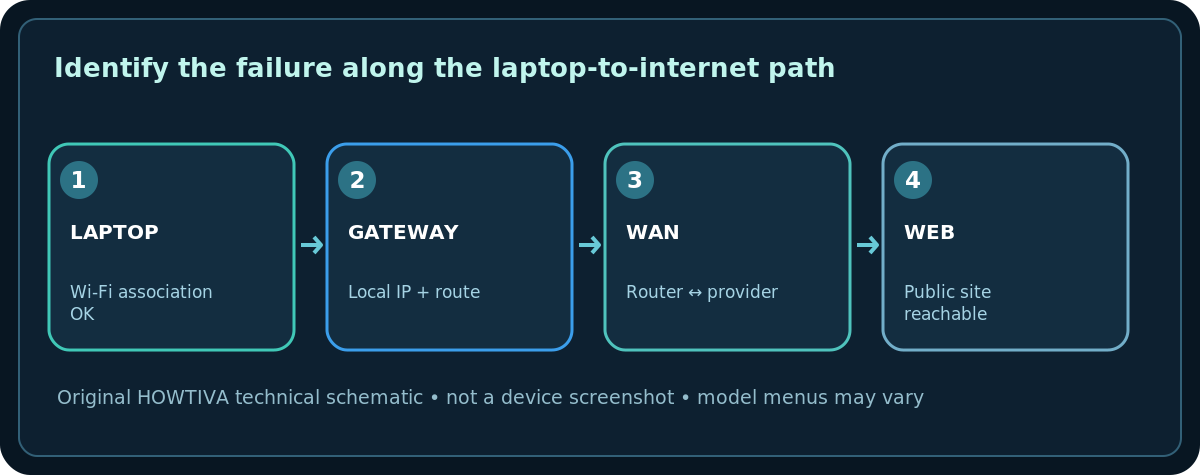
“Connected” confirms a local wireless association; it does not guarantee that a public website is reachable. A laptop can connect to a router that has lost its upstream service, or it can have an incorrect address, blocked DNS, VPN or proxy. The diagram below separates those paths.
First, locate the failure
- On the laptop, open two unrelated, known websites to rule out one site being down.
- Use another phone on the same Wi-Fi with mobile data temporarily disabled. If the phone also fails, investigate router/ISP before adjusting the laptop.
- If the router has a WAN/Internet status indicator, check the manufacturer’s definition of that light. The color is not universal across brands.
- If an Ethernet connection is available, test it. Wi-Fi failing while Ethernet works points toward local wireless settings; both failing suggests an upstream problem.
Repair a Windows 11 connection
- Select the taskbar network icon and confirm the laptop is on the expected SSID, not a hotel login page, captive guest network or neighboring network.
- Toggle Wi-Fi off, then on. Reconnect and retry your sites. This does not delete your saved password.
- Open Settings > Network & internet and run the Get Help network and internet troubleshooter if offered. Follow its messages rather than blindly accepting every advanced repair.
- For a specific corrupt profile, select Settings > Network & internet > Wi-Fi > Manage known networks, choose the network, then Forget. You will need its password to rejoin.
- Pause or disable a VPN or manually configured proxy only if your employer or service policy permits and test again. Restore required settings afterward.
Check IP and DNS safely
- Open Command Prompt, run
ipconfig /all, and look at the Wi-Fi adapter’s IPv4 Address, Default Gateway, and DNS Servers. Don’t paste the whole output publicly because it may identify your network and adapters. - A typical
169.254.x.xaddress without an expected gateway can indicate that DHCP did not provide a usable address. Verify that the router’s DHCP service is running, or contact the managed-network administrator. - Try reaching the local router through its documented management address. If the local router is unreachable, repairing public DNS alone cannot fix that path.
- If local routing works but names fail, use
ipconfig /flushdnsas a limited Windows DNS-cache step. It doesn’t repair a damaged cable or a disconnected WAN. - As a controlled step on a personally managed PC, Microsoft documents
ipconfig /releasefollowed byipconfig /renewto request a new address. These commands temporarily disconnect the adapter; don’t use them while depending on a remote support session.
If everyone in the house has no internet
Check the ISP’s official service/outage page from mobile data. Inspect power to the modem or fiber ONT and the cable between it and the router. A normal restart of the provider gateway may help, but tell others and wait for it to finish booting. Do not unplug optical fiber connectors, open service equipment, or factory reset ISP equipment without guidance.
Other possibilities and remedies
- Hotel/airport Wi-Fi: You may need a captive-portal browser login or to accept terms. Do not enter account details on suspicious redirected sites.
- One app only: Test a browser and another app. App-specific firewall rules or server faults may be responsible.
- Corporate laptop: Device management, certificates and VPN policies can prevent troubleshooting changes; contact IT.
- Only after sleeping: Driver or adapter power management may be involved; use official vendor support and updates.
- Repeats after multiple fixes: Record timestamps, model, OS and status before escalating; avoid erasing useful router logs with repeated resets.
When network reset is appropriate
Microsoft lists Network reset under Windows 11 Settings > Network & internet > Advanced network settings > Network reset, but warns that it reinstalls adapters and can require VPN and virtual-network software to be reconfigured. Treat it as a last resort after saving necessary settings.
Frequently asked questions
Does “connected” mean my subscription is active?
No. It only describes a local connection. Billing, outages or a disconnected WAN can prevent outside access.
Will changing DNS always fix it?
No. DNS settings matter when hostname resolution is the failure. A missing route or modem signal needs another remedy.
Should I press the router’s reset pin?
No. The reset pin often restores factory defaults and can delete the ISP connection, SSID and security configuration.
Sources & Further Reading
- Microsoft — Fix Wi-Fi connection issues in Windows (checked 2026-10-27).
- Microsoft — Essential network settings and tasks in Windows (checked 2026-10-27).
- AT&T — Troubleshoot your internet (checked 2026-10-27).
Use the checklists as you go, and confirm the result before moving on to a more involved repair.