How to Check Whether a Website Is Legitimate
Check the full domain and independently verify the business. HTTPS alone does not make a site legitimate.
Quick answer: Before entering payment details or signing in, check the exact website address, find the business through a source you trust, verify the service’s identity and contact information independently, and pay attention to browser safety warnings. A padlock or HTTPS does not prove a website is legitimate—scam sites can use encrypted connections too.
No single visual clue certifies that a site is safe. Your practical aim is to reduce the likelihood of sending credentials, money or files to an impostor. Use several independent checks and stop if the site asks for an unusual security bypass.
Check the real domain before you interact
- Tap or click the browser’s address field to reveal the full hostname; a compact address display can hide important parts.
- Read the hostname from the right-hand domain ending backward. For example,
account.example.combelongs underexample.com, whereasexample.com.login-portal.testbelongs underlogin-portal.test. These are illustrative reserved domains, not actual services. - Look for extra letters, swapped characters, unusual endings, deceptive hyphens or lookalike brand names. Attackers can place a familiar word anywhere in a different domain.
- Confirm the address using an official app, printed statement, trusted bookmark or an independently located company contact—not a link in the suspicious message that brought you there.
- Inspect what the site asks you to do. Unexpected password re-entry, gift-card payment, remote-access installation or a request for an MFA code is a reason to stop and verify.
- If the browser displays a Safe Browsing or SmartScreen warning, do not bypass it simply to finish a purchase or log in. Return to the legitimate service through another route.
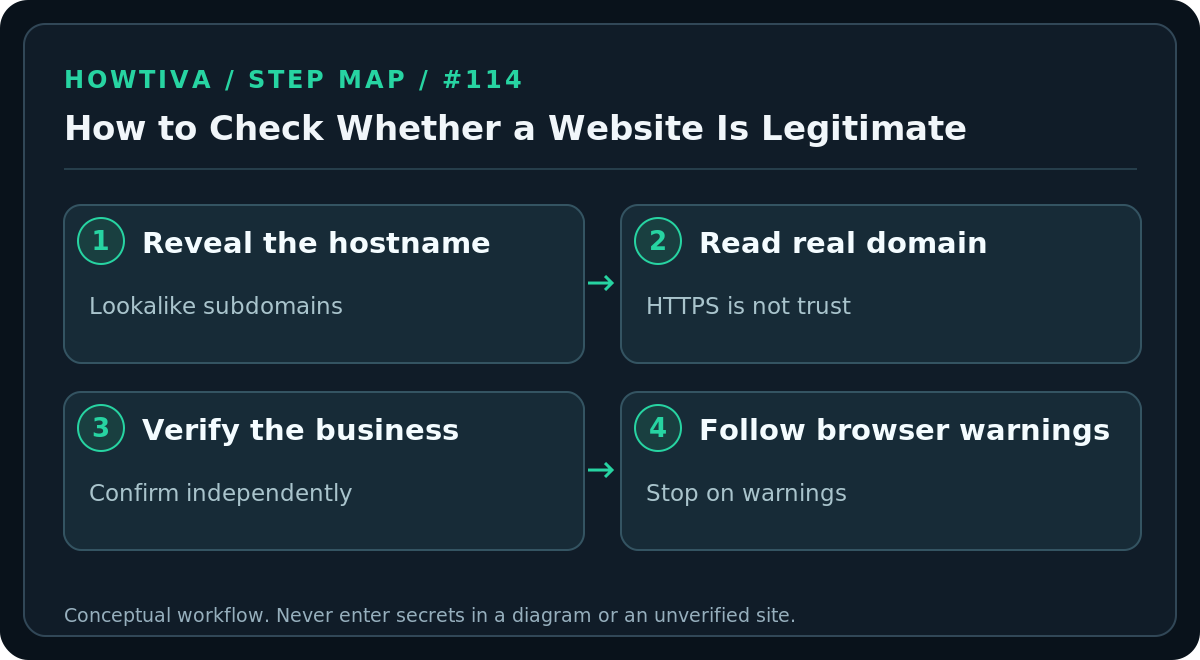
A domain can be genuine while an individual page or seller is malicious, so a familiar address alone is not sufficient. Conversely, a legitimate business may use a separate payment processor or customer-service domain; if so, verify that relationship from the original official site before proceeding.
Check who is behind a shopping or service site
Look for a business name, real contact route, clear refund or return policy and consistent information across independent references. Search for complaints using the business name plus terms such as “scam” or “complaints,” while remembering that reviews can be purchased or manipulated. Unusually low prices, short-lived countdowns and requests for unprotected payment methods justify caution.
A site with few reviews is not automatically fraudulent; new legitimate shops exist. A professional-looking website and positive reviews are also not guarantees. Prefer payment methods with an established dispute process; avoid sending money directly to an unfamiliar individual by irreversible methods merely to receive a supposed discount. Where payments or identity verification are involved, read the applicable provider’s current policies.
What browser security indicators do—and do not—tell you
HTTPS: The connection between your browser and that domain is encrypted, but the operator might still be dishonest. Do not treat the padlock or “connection is secure” notice as a background check.
Google Safe Browsing warnings: Chrome may display “Dangerous site” or “Fake site ahead” if it detects malware, phishing or a lookalike address. Google’s help recommends not visiting dangerous sites. A site without a warning has not necessarily passed a comprehensive fraud review.
Microsoft Defender SmartScreen: Edge may warn about unsafe pages or downloads based on reputation and other checks. Such warnings deserve attention. Both detection systems can miss new threats or flag legitimate pages in error; evaluate using independently confirmed information.
A safe alternative to testing a suspicious page
Do not create a “test login” using your real password, and do not intentionally run a file to see what happens. If an online shop seems dubious, leave and find the merchant through its verified app or official social presence—but verify those accounts too. If a bank or government agency appears to have moved domains, contact it using an existing statement or official phone directory before providing information. For work-related sites, ask IT to assess the URL in an approved analysis system.
Troubleshooting and examples
- A seller says only crypto, wire transfer or gift cards are accepted: Avoid payment until you independently establish legitimacy; irreversible payment offers less practical recourse.
- The website says “Your computer is infected—call now”: Close the page rather than calling the displayed number or installing suggested remote-support software.
- The address is shortened or hidden in a QR code: Do not scan blindly; ask for the official domain or inspect the target safely before interacting.
- The browser warning seems incorrect: Use an independent route to confirm the actual organization. Only site owners or an authorized reporting process should pursue a false-positive review; do not disable protection to make the warning disappear.
- You already supplied payment information: Contact your bank or card issuer using the number on your card, save transaction evidence and monitor for unauthorized charges.
- You entered an account password: Go to the real service, change it, revoke unfamiliar sessions and secure any accounts that reused it.
FAQ
Does a valid SSL certificate guarantee a real company? No. Certificates help encrypt connections and can be issued to fraudulent domain owners.
Does an old domain always mean a trustworthy site? No. Domains change ownership and genuine sites can be compromised; age is only one contextual clue.
Can a web search result be an advertisement for a fake site? Yes. Search ranking and paid placement do not verify that a particular business is legitimate.
Sources & Further Reading
- Chrome unsafe-site warnings — lookalike URLs, warnings and recommended caution.
- Microsoft Edge SmartScreen — security warnings and reporting.
- FTC phishing guidance — check organization using known official website or phone.
Use the checklists as you go, and confirm the result before moving on to a more involved repair.