How to Report a Phishing Website
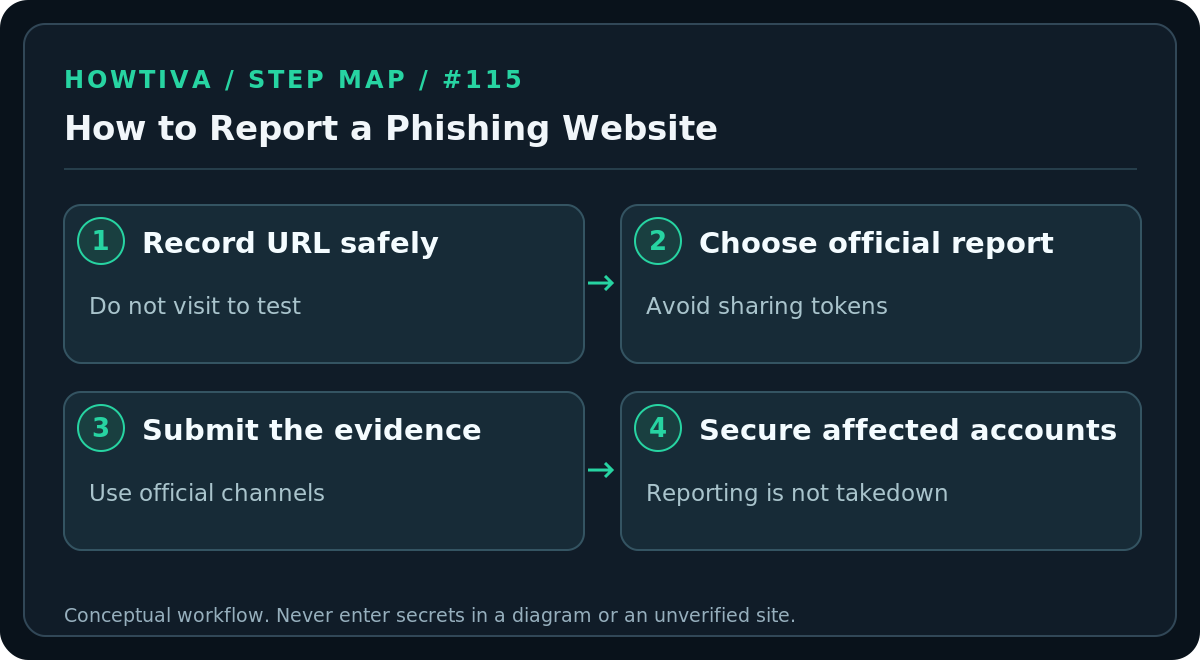
Record the suspicious URL without interacting, then use Google Safe Browsing or Microsoft’s official unsafe-site reporting form.
Quick answer: Record the suspicious web address without logging in or downloading anything, then report it through the appropriate official channel: Google Safe Browsing’s phishing report form, Microsoft Defender SmartScreen’s unsafe-site report, or the affected brand’s verified abuse contact. If the site was used to steal money or credentials, report the underlying fraud to the relevant provider or authorities as well.
Reports can help reputation and blocking services investigate; they do not guarantee immediate takedown or reimbursement. Do not repeatedly visit a malicious page to gather screenshots, and never share credentials or recovery codes to “verify” a report.
Collect enough information safely
- Stop interacting with the page. Do not complete forms, submit passwords, approve a notification request or run downloaded files.
- Copy or record the visible URL from your browser if safe to do so. If a suspicious link arrived by email, you can copy its target without opening it, where your email client supports that safely. On mobile, controls vary; if unsure, do not tap it.
- Record context: why you think the page is phishing, what organization it impersonates, the approximate time and how you encountered the link.
- Protect private information. Check whether a URL contains email addresses, account tokens, unique invitation codes or session identifiers. Avoid posting such URLs publicly; use a trusted provider’s private reporting channel and include only information necessary for investigation.
- Submit through one or more appropriate official reporting channels listed below. Keep the confirmation if one is provided, without assuming the site was removed.
Report to Google Safe Browsing
Open Google’s official phishing report page at https://www.google.com/safebrowsing/report_phish/. Google documents this route for phishing URLs not already present on its blocklist. Supply the suspicious URL and the information requested by the current form. This report is about a website, not the same action as Gmail’s Report phishing button for a suspicious email.
If Google already warns about a site but you are certain it is a false positive, Google also documents a separate report error route. An ordinary reader should not bypass an unsafe-site warning to prove the site can load.
Report to Microsoft SmartScreen
Microsoft provides an unsafe-site submission form at https://feedback.smartscreen.microsoft.com/en-us/wdsi/support/report-unsafe-site (which may redirect to Microsoft’s current reporting page). Depending on the form, you may sign in or continue as a guest. Choose the relevant threat category and submit the URL as instructed. In Edge, Microsoft’s support article also documents Settings and more → Help and feedback → Report unsafe website for a page SmartScreen missed; menu wording can vary.
The Microsoft process may include spam controls or confirmation prompts. If a report form is unavailable, try the verified provider help page later. Do not use a third-party “takedown agent” demanding your login codes.
Report the scam beyond browser blocklists
If a phisher impersonates a bank, retailer or service provider, find that company’s security or abuse contact from its legitimate website. The company may be able to warn customers or initiate action through its hosting and brand-protection teams. For U.S.-relevant consumer fraud, the FTC accepts reports at ReportFraud.ftc.gov; other countries have their own national fraud and cybercrime channels. Reporting to a search or browser provider does not necessarily report financial fraud to law enforcement.
If you encountered the URL in Gmail, report the email through its More → Report phishing option. Your workplace may require submitting the message to internal IT first. Preserve evidence through approved channels if a payment or workplace account was involved.
What happens after you report?
A report can contribute to detection, review or reputation signals. The site may remain accessible while being investigated, may move to another domain or may not be classified as malicious. A lack of visible change is not evidence that your report was ignored. Avoid revisiting the site to check its status. If you are an account holder affected by the phishing, secure that account separately—reporting does not log out the attacker.
If you already entered information or installed software
Password or code entered: Navigate independently to the real service, change the password, replace reused passwords, review security methods and revoke unknown sessions. If an active sign-in was approved, notify the provider immediately through official support.
Payment made: Contact the card issuer, bank or payment service via established channels, preserve transaction records, and follow the provider’s fraud process. Do not pay a second “release fee” to recover lost funds.
Software installed: Disconnect a potentially infected device if malicious activity is suspected; follow your organization’s security policy for a work device and seek reputable security assistance for a personal device. Simply closing the browser will not uninstall malware.
Troubleshooting
- The page is gone: You may still be able to report the URL and contextual evidence; do not recreate or interact with a clone.
- The report form rejects a URL: Make sure it is a URL, not the email’s display text. Be mindful of embedded secrets and use the form’s support instructions rather than pasting the link widely.
- You cannot tell whether it is phishing: Avoid categorical accusations. Describe what you observed and let the provider investigate.
- Your browser already blocks it: Respect the warning. Reporting additional evidence may still be useful, but visiting the page is unnecessary.
FAQ
Will a phishing report automatically remove a site? No. Browser warnings, hosting takedowns, domain registrar action and law enforcement are different processes.
Should I share the URL on social media to warn others? Avoid amplifying an active malicious link. A non-clickable description and official report are generally safer.
Sources & Further Reading
- Google Safe Browsing Reporting Incorrect Data — Google official phishing-report URL.
- Microsoft report unsafe site — Microsoft SmartScreen unsafe site submission.
- Microsoft Edge report option — Edge Help and feedback > Report unsafe website.
- FTC report phishing — ReportFraud.ftc.gov and APWG.
Use the checklists as you go, and confirm the result before moving on to a more involved repair.