How to Change DNS Settings on Windows 11
Change Windows 11 DNS server assignment, understand DNS over HTTPS, test resolution and restore DHCP.
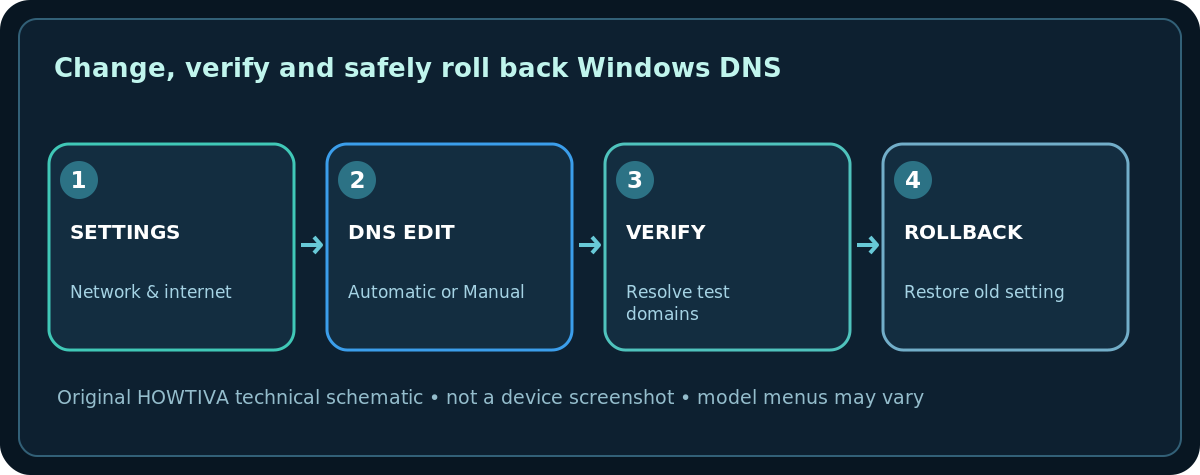
Quick answer: On a Windows 11 PC, open Settings > Network & internet, select the connection’s Properties, find DNS server assignment, choose Edit, and enter the DNS servers you intend to use. Save, then verify that name lookups still work. Record the old setting first so you can revert.
DNS turns names such as example.com into addresses. It does not increase Wi-Fi radio strength or restore a modem with no internet signal. On school, office or managed devices, changing it may break private resources, filtering, split-DNS or VPN access; ask your administrator first.
Before you change DNS
- Check whether your connection is Wi-Fi or Ethernet and whether the issue is genuinely name resolution. If every device is offline, fix the internet connection before DNS.
- Note whether DNS is currently Automatic (DHCP), usually recommended on a standard home network, or already manually configured.
- Choose a trusted resolver and verify its published addresses and privacy terms directly from the provider. Do not copy arbitrary server addresses from comments.
- Confirm whether your employer’s VPN, parental controls, filtering or router settings require the existing DNS service.
Change DNS server assignment in Windows 11
- Open Start > Settings > Network & internet.
- Choose your active Wi-Fi network properties or Ethernet connection properties. Settings wording and screen layout can vary with Windows 11 updates.
- Find DNS server assignment and select Edit. Use Manual if you want to specify DNS for this adapter.
- Turn on IPv4 (or IPv6 if you have correct IPv6 server addresses). Enter the provider’s Preferred DNS and optionally its Alternate DNS addresses. Never paste an IPv4 address into an IPv6 field.
- If a DNS over HTTPS (DoH) choice is present, use only a template documented for that provider. On (automatic template) depends on Windows recognizing the resolver; manual templates require the correct URL supplied by the service.
- Choose Save, reconnect if needed, and test two previously working names. Record any errors so you can reverse the change.
What DoH and fallback mean
DoH encrypts DNS queries when configured correctly, but it does not encrypt all browsing or replace a VPN. A fallback-to-plaintext option may send queries without DoH if the encrypted path fails. Decide based on your threat model and provider support; do not claim all lookups are encrypted merely because a switch is visible. Windows 10 has different UI and does not offer the same DoH setting documented for Windows 11.
Verify and revert safely
- Open a browser and test a few known sites; also test any local printer names, NAS names, or company intranet resources you normally use.
- In Command Prompt,
ipconfig /allshows configured DNS servers. You can usenslookup example.comto ask the current resolver for an example hostname. This is a functional check, not a privacy audit. - If name resolution worsens, return to DNS server assignment > Edit > Automatic (DHCP) if that was the original setting. If it was a custom corporate setting, restore the exact recorded values instead.
- A stale cache can sometimes be cleared with
ipconfig /flushdns, but flushing does not diagnose a broken router or disconnected ISP.
Troubleshooting common mistakes
- Saved but no sites resolve: Check IPv4/IPv6 address formats and whether your provider can be reached. Revert and test again.
- Some internal resources disappear: VPN or corporate split DNS is likely; restore the managed settings.
- DoH unavailable: Not every resolver, Windows version, policy or device supports the displayed choice. Do not force an unverified template.
- Another device works: The Windows DNS setting might be local to this adapter; your router and other devices need not use it.
- Captive hotel Wi-Fi cannot sign in: A custom DNS setting can interfere with captive-portal detection; restore automatic settings and follow the network’s normal sign-in flow.
Frequently asked questions
Is DNS the same as a VPN?
No. DNS resolves names; even encrypted DNS does not automatically protect all traffic or hide network activity.
Do I need both preferred and alternate DNS?
A provider may publish a secondary resolver for resilience, but use its documented configuration. Don’t mix unrelated filtering services without understanding fallback behavior.
Will this change the router’s DNS for everyone?
No. Changing an adapter’s DNS setting normally affects that Windows connection, not the whole home router.
Sources & Further Reading
- Microsoft — Essential network settings and tasks in Windows (checked 2026-10-27).
- Microsoft — Fix Wi-Fi connection issues in Windows (checked 2026-10-27).
Use the checklists as you go, and confirm the result before moving on to a more involved repair.