How to Track Your Expenses
Track bank, card and cash spending without double-counting transfers. Includes a transaction ledger, refunds and reconciliation.
Quick answer: Pick a fixed review period, capture every purchase and fee from cards, bank accounts and cash, classify each transaction once, reconcile entries against actual statements, and compare each spending category with your budget. Track what actually happened, not just what you intended to spend. A simple spreadsheet or paper log is enough.
What you will finish: A repeatable transaction ledger and a category summary that reveals where money went, which charges were repeated, and which entries require checking. The tables use hypothetical US-dollar amounts, not real account data. This is practical education, not a recommendation to share private banking credentials with tracking apps.
Prepare the records and a safe workspace
Gather recent bank and credit-card statements, receipts for cash spending, subscription notices and a list of accounts you use. Choose a month and consistent currency. Never place passwords, full card numbers, account numbers, security codes or unredacted bank statements in a public spreadsheet or AI chat. A local, password-protected file or secure paper notebook may be sufficient. If you use an app that connects to accounts, independently review its data-access permissions, privacy policy and cancellation/export features.
Decide whether your view covers a person or the household and whether it is a cash-based record of payments or a purchase-based record of spending. For a household budget, recording purchases when they occur is usually easier than counting a credit-card purchase and then the whole card payment as two unrelated expenses. For a more formal accounting or tax use, consult the relevant rules instead.
Step 1 — Make a ledger with fields you can reconcile
Create these columns: transaction date, payee or description, account/payment type, category, money out, money returned, notes, reconciliation status. Optionally add bill due date and a recurring flag. The simplest entries are factual and neutral: “supermarket $48.20,” not “bad grocery decision.” Avoid storing unnecessary identifiable transaction details.
An expense log can be on paper, a spreadsheet or an approved bank export. In a spreadsheet, lock header rows, use number formatting rather than typing currency symbols into amount cells, and keep original downloaded statements unedited. Save a clean working copy before you adjust categories.
Step 2 — Capture all real expenses (including cash)
Work through each statement chronologically and enter purchases, bill payments, interest charges and fees. Add cash purchases from a receipt or a daily pocket note. Check all payment accounts; a small automatic subscription on a rarely used card still matters. Include refunds as a negative amount against the original spending category whenever possible. Pending transactions may change or disappear; treat them as provisional and check the posted statement before final reconciliation.
Do not automatically count transfers between your own accounts as consumption. A $200 transfer from checking to savings changes the location of money; it is not the same as paying $200 to a shop. Similarly, a credit-card payment can settle spending already recorded: track the original purchases and separately track interest and fees. If your aim is actual cash movement rather than spending, show the card payment as a cash outflow but identify it as settlement, not a new purchase.
Step 3 — Use a small, stable category system
Start with housing, groceries, utilities, transport, insurance, required debt cost, health, subscriptions and discretionary spending. Add a category only when it would change a decision. For mixed store receipts, classify by the largest practical component or split the amounts if the details are easy to obtain. Be consistent: a $10 coffee categorized as dining out in January should not become groceries in February without a good reason.
Use a separate marker for internal transfers, refunds, business expenses and reimbursements. If you share a cost with someone who pays you back, show both the full purchase and the reimbursement so the net household cost is understandable. Record reimbursements consistently rather than pretending the original purchase never occurred.
Step 4 — Work a complete transaction example
This small ledger is entirely hypothetical. No entry represents an actual bank statement or account. A negative figure in the money-returned column is not needed; refunds are explicitly shown in their own column.
| Posted item | Category | Money out | Money returned | Net expense |
|---|---|---|---|---|
| Rent payment | Housing | $1,300.00 | $0.00 | $1,300.00 |
| Supermarket | Groceries | $48.20 | $0.00 | $48.20 |
| Fuel | Transport | $42.50 | $0.00 | $42.50 |
| Coffee | Dining | $6.80 | $0.00 | $6.80 |
| Grocery item refund | Groceries | $0.00 | $12.00 | −$12.00 |
| Video subscription | Subscription | $20.00 | $0.00 | $20.00 |
| Savings transfer | Internal transfer | $200.00 | $0.00 | Not an expense |
| Consumption expense total | $1,417.50 | $12.00 | $1,405.50 |
Arithmetic: $1,300 + $48.20 + $42.50 + $6.80 + $20 − $12 = $1,405.50. The savings transfer affects account cash but does not change that consumption total. Housing is $1,300; groceries net to $36.20; transport is $42.50; dining is $6.80; subscription is $20.
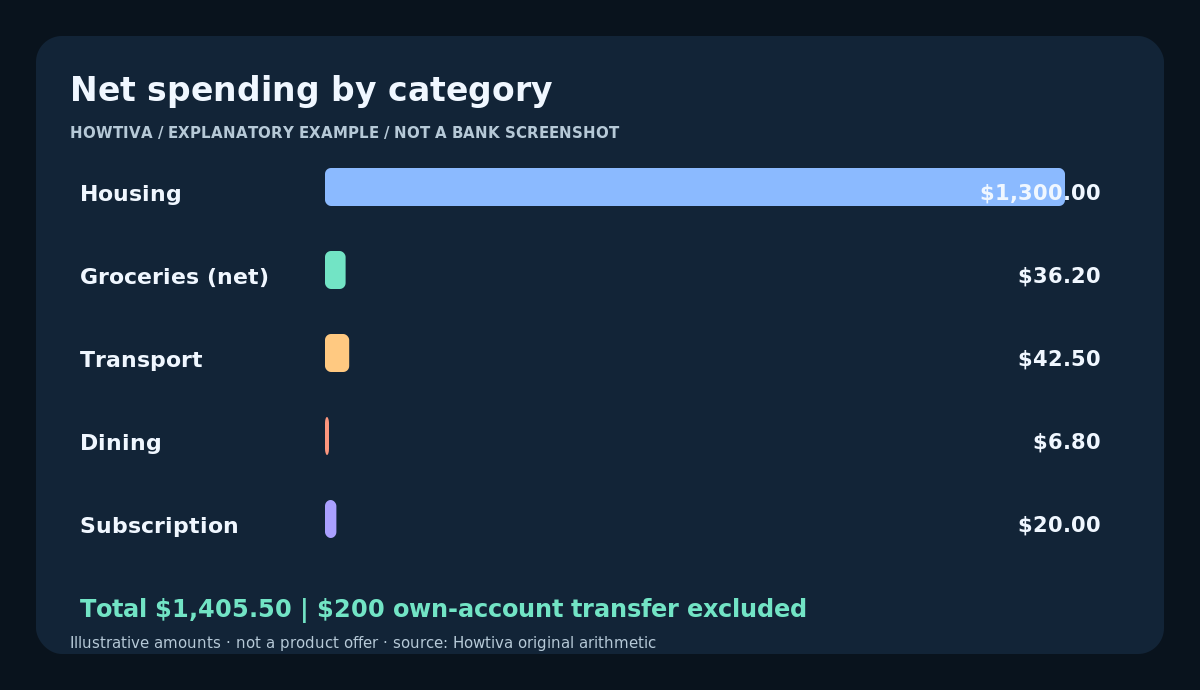
Figure: Sample six posted transactions including a $12 grocery refund total $1,405.50 in consumption spending; the $200 transfer is excluded.
Step 5 — Reconcile to statements without double-counting
For each account, compare the items and amounts in your ledger with posted bank or card transactions. Mark entries matched. Investigate an unrecognized charge promptly using the card issuer’s official contact route rather than assuming it is a category error. Use the opening and closing balance, deposits, withdrawals and transfers to check that cash movement adds up. This check is different from a spending-category total because income, internal transfers and card liability payments affect cash too.
If the ledger differs from your statement, first look for pending purchases, cash withdrawals versus the later cash purchases, reversals, fees, foreign-exchange differences, duplicate exported rows, subscriptions on a second card and settlement-date discrepancies. Keep a note rather than deleting evidence of a mismatch. Do not assume a bank will automatically correct an error based on your spreadsheet.
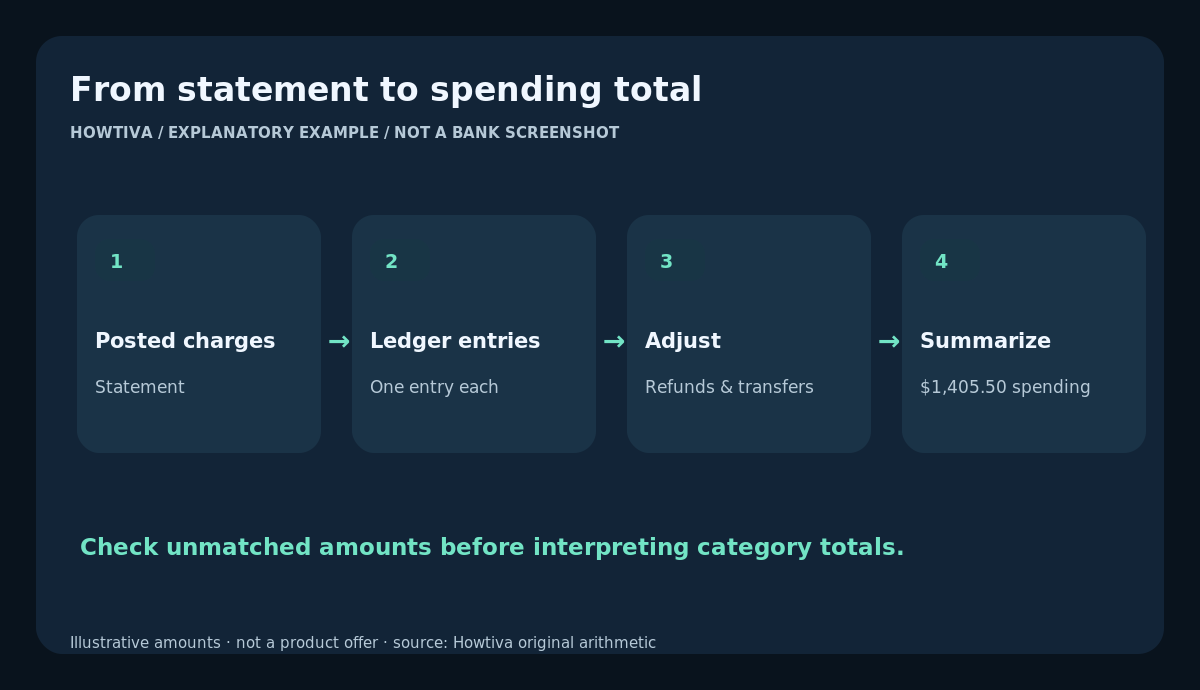
Figure: Workflow: capture posted transactions, classify, separate transfers and reversals, and compare expense totals with budget.
Step 6 — Turn the ledger into decisions
At the end of each week, total expenses by category. For a category budget of $250, an actual spend of $190 leaves $60 of that category’s allocation, not necessarily $60 available in the account. If total actual spending exceeds what the household can afford, identify whether it was a one-off planned purchase, missing annual bill, higher essential cost or controllable habit. Focus on a small number of practical actions: revise a low estimate, cancel an unused subscription through the official provider, or reserve a realistic grocery amount next month.
Repeat over several months to see seasonal effects. Compare like for like, using posted dates and one category method. Inflation or price changes may also affect totals, so a higher total does not always mean you bought more units. Check quantities when that distinction matters.
Troubleshooting and common errors
- The bank lists the same pending charge twice. Wait for posting; don’t sum both provisional and final transactions without checking.
- A cash withdrawal is counted as spending and each cash purchase is counted again. Classify the withdrawal as movement to your cash wallet if you are tracking purchases. Then enter each actual cash purchase.
- My credit card bill looks like a giant new expense. Purchases may already be in the ledger. Separate settlement of the card balance from new interest or card fees.
- Income from roommates masks the true rent. Use the gross rent plus their reimbursements, or consistently record only your share. Explain your rule in the ledger.
- Some bank exports use negative for debits, others positive. Normalize the sign convention once and check the first few transactions manually.
- A refund crosses months. Keep both dates in the original periods and optionally create a category net-spend view across the full period; never quietly rewrite a previous bank statement.
- A charge is unfamiliar. Verify the merchant descriptor and contact the issuer via a trusted route quickly; tracking is not a substitute for timely fraud reporting.
Alternatives, accessibility and special circumstances
A paper pocket log works for cash-heavy spending. A spreadsheet offers filters and formulas without sharing data with a third party. A bank-provided category tool can help, but categories may be wrong: audit a sample manually. For multiple currencies, keep the original transaction amount/currency and the actual converted amount posted; do not invent an exchange rate. Separate self-employment business spending from personal spending, especially where record-keeping or tax rules apply. If tracking feels overwhelming, start with one week of expenses and expand after reviewing what you missed.
Country notes
The ledger arithmetic is universal. In the United States, CFPB offers spending trackers and cash-flow budgeting worksheets. The UK MoneyHelper Budget Planner uses account, bill and payslip information; Canada’s FCAC advises knowing where money goes; Australia’s Moneysmart budget tool supports expenses with different payment frequencies. Refund processing, dispute periods, banking data-access rules and statement formats depend on provider and jurisdiction; this article does not assert a universal deadline. References reviewed 27 October 2026.
Frequently asked questions
Should I include cash withdrawals as expenses?
Only once. Either treat the cash withdrawal as money spent (simple cash-outflow method) or track the purchases made with that cash (purchase method); avoid counting both.
Is transferring money to savings an expense?
No, not consumption. It is an allocation or transfer. You may show it in your budget cash-flow view, but do not add it to shop and bill expenses a second time.
How long should I track before making a budget?
One month reveals useful habits; several months better capture irregular costs. Start your budget with what you have, and refine as your evidence improves.
What do I do with shared bills?
Choose either gross household costs plus reimbursements or your individual share and document the convention. Do not mix conventions within a comparison.
What if I notice a charge I did not authorize?
Contact the card provider or bank promptly using its genuine app, statement or official website. The steps and legal protections vary by jurisdiction and account type.
Final checklist
- Set a fixed timeframe, household boundary and currency.
- Capture purchases from all accounts and cash sources.
- Separate transfers, refunds, reimbursements and card settlements.
- Use consistent categories and sign conventions.
- Reconcile every posted transaction; investigate mismatches.
- Compare actual category spend against the budget weekly.
- Protect sensitive account information and local records.
Sources & Further Reading
- CFPB — Your Money, Your Goals: Spending tracker and cash-flow tools
- CFPB — Get your money situation in order
- MoneyHelper — Budget planner
- FCAC — Making a budget
- ASIC Moneysmart — Budget planner
Editorial note: Official financial-literacy resources reviewed on 27 October 2026. Worked amounts are fictional. No account, transaction or software import was personally tested.
Use the checklists as you go, and confirm the result before moving on to a more involved repair.