How to Organize and Protect Important Financial Documents
Build a safer document index with protected originals, secure copies, recoverable backups and practical emergency access.
Quick answer: Make an inventory of your essential financial and identity records; separate originals, working copies and emergency-access instructions; store originals in a secure physical location and encrypted or otherwise strongly protected digital backups; and arrange for trusted access when necessary. Set review dates and retain documents according to their actual legal and practical purpose rather than following one universal shred-after-three-years rule.
What you will achieve: A practical document index, a folder structure, an emergency retrieval plan and a safer disposal routine. This guide helps organize personal papers; it cannot replace a legal estate plan, cybersecurity assessment or jurisdiction-specific retention advice.
Before you start: what to collect and whom to protect
Set aside time to list bank and credit-account contacts, insurance policies, income or tax records, loan agreements, major purchase records, property titles, employment and pension paperwork, identity papers, and wills or powers of attorney where relevant. You need not collect every account number into one unprotected document. For each record, note what it is, where it is, who should be allowed to access it and when it should be reviewed.
Do not upload copies of IDs, passwords, seed phrases, government identification numbers or bank statements to an unfamiliar app. Minimize the sensitive data in your index. A record can be referenced by institution name and last four digits only, where useful, while the complete statement remains in a secured folder. Take particular care with information about dependents, former partners and people who have not consented to wider sharing.
Step-by-step: make a secure financial document system
Step 1 — Sort by use, not the order in which mail arrived
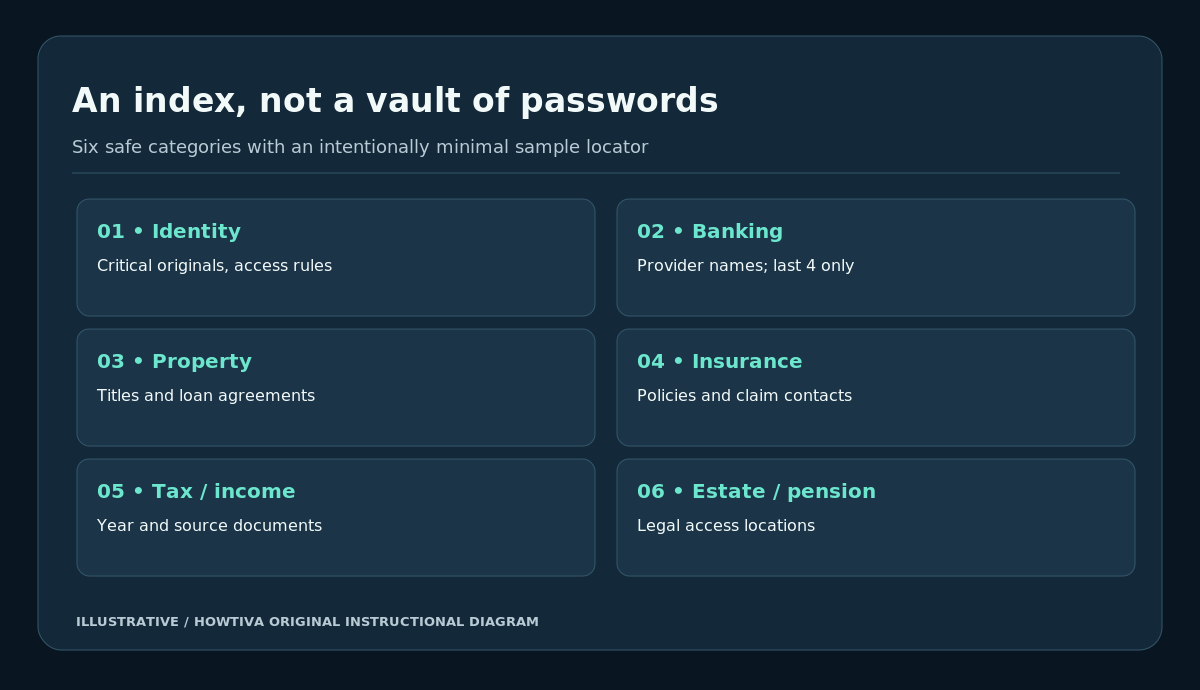
Create at least six categories: Identity_and_Vital, Banking_and_Credit, Housing_and_Property, Insurance, Tax_and_Income, and Estate_and_Retirement. Add Active_Disputes when you have unresolved chargebacks, tax notices or insurance claims. The category name should make documents easy for you or a trusted helper to locate. Do not include passwords in folder names, filenames or spreadsheet notes.
Make a simple index with Document Type | Issuer | Year | Storage Location | Authorized Contact | Review Date. For example, Home insurance / Insurer A / 2026 / encrypted folder Insurance / owner only / renewal month. This is fictional, contains no real account details, and still identifies the relevant document when it is needed.
Step 2 — Identify documents whose originals really matter
Some records, such as original property deeds, wills, birth or marriage certificates or specific notarized documents, may need special treatment depending on the jurisdiction. Other records, such as routine bank statements, may be usable as secure downloaded copies. Never assume scanning makes an original legally dispensable. The FTC recommends retaining and locking up core identity, legal and estate papers; the appropriate local authority or lawyer should confirm whether a particular original is needed.
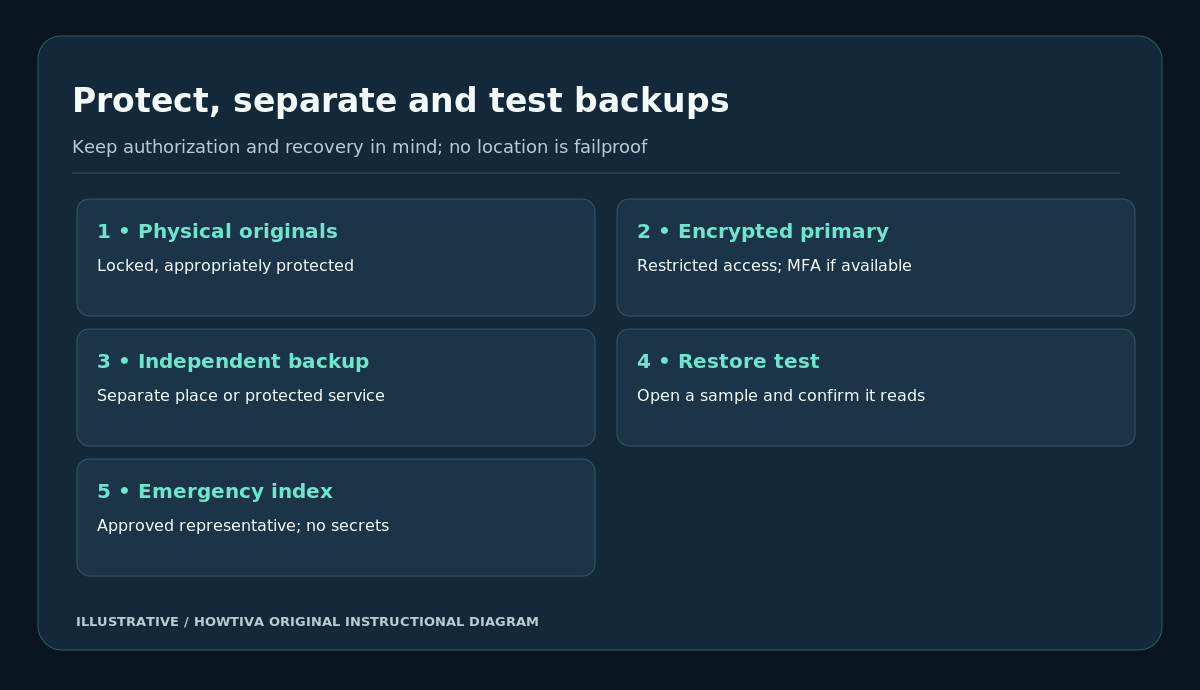
Store physical originals in a locked, reasonably fire- and water-resistant place appropriate to the item, while recognizing that no container is guaranteed disaster-proof. If using a bank safe-deposit box, confirm access arrangements after death or incapacity, opening hours and whether an authorized person can enter when needed. A hard-to-access original can defeat the purpose of preserving it.
Step 3 — Build a protected digital copy set
Scan pages legibly, including backs with material terms, keeping full filenames and dates. Use standard readable PDFs where possible. Put digital documents in a private, access-controlled folder with a strong account password, multifactor authentication where supported and encrypted storage or a reputable encrypted backup. Keep recovery information somewhere safe that does not expose all authentication factors in the same unlocked folder.
Avoid emailing copies of ID to yourself simply to store them. For document transfer to a tax professional, insurer or lender, verify the recipient and use an appropriate secure portal. Once a temporary share has served its purpose, revoke access. Consider whether a particular service keeps its own copy after sharing.
Step 4 — Keep more than one recoverable copy
A single laptop can be stolen, corrupted or destroyed. Have a primary protected copy and at least one separate backup, physically or logically isolated from the first. Periodically restore or open a sample PDF from the backup. A backup that cannot be read or requires a lost password does not protect your records. Where you use cloud syncing, understand that synchronizing a mistaken deletion is not always the same as preserving a historical backup.
Your protected index should tell you where originals and backups are located but should not contain complete bank passwords, government numbers, recovery codes, wallet keys or card security codes. Those require purpose-specific secure handling.
Step 5 — Prepare emergency access without publishing secrets
Identify a trusted household member or appointed representative, appropriate to your circumstances. Provide an emergency contact list that includes institution names, insurers’ public phone numbers, policy locations and the location of any legal authority documents. Explain how the authorized person may obtain access lawfully if you are incapacitated; legal authority varies by country. Avoid sharing primary login credentials, even with someone trusted, when institution-supported delegations or powers of attorney are available.
The US CFPB suggests gathering and protecting copies of insurance, property, tax, employment and identity records in advance of disasters. Keep an emergency retrieval copy where it remains secure yet accessible if you must evacuate. Test whether someone could actually find the index without needing to guess the filing scheme.
Step 6 — Add an annual update habit and task triggers
Review the index at least once a year, and sooner after moving, a new mortgage, an insurance renewal, a major purchase, a new child, divorce, a name change or a death in the family. Replace outdated policies and contact information, but retain superseded documents if they support a claim or tax position. Record the review date rather than relying on memory.
As an illustrative organizational exercise, suppose you have 6 category folders, review 2 categories each month for the next 3 months and then repeat annually. You will have reviewed all 6 by the end of month 3. This is a workload illustration, not a legal deadline or promise that every item has been authenticated.
Step 7 — Set retention rules by document purpose and jurisdiction
Keep property basis documents while they may still affect tax, title or ownership claims. Keep legal and identity originals for the appropriate period, often long term or indefinitely. For tax documents, retention depends on country, filing dates, assessments and exceptions. In the US, IRS rules may be three years in many ordinary cases but longer in others; Canada generally requires at least six years for income-tax records; UK self-employment and employee rules differ; Australia generally has a five-year rule measured from filing for many income-tax receipts. Check the current law and any active legal disputes before disposing of a document.
The FTC’s 2025 consumer guide gives practical document-keeping categories, but it does not override tax laws, property obligations or an active claim. A bank statement relevant to a dispute or the basis of a property transaction may need retention longer than a routine statement.
Step 8 — Dispose of records securely and verify deletion
Shred paper that contains identifying data instead of throwing it into household recycling. For electronic records, remove working copies from unnecessary downloads, shared folders and old devices through the appropriate deletion or secure-disposal process; make sure that any retained backup is still authorized. For old drives or phones, follow secure device-disposal guidance, not just moving files to Trash. Keep a simple log when destroying unusually important records, recording document class and date without reproducing sensitive content.
Example document index (fictional, not a real statement)
| Category | Document | Suggested location | Review trigger |
|---|---|---|---|
| Banking | Main account statement | Encrypted banking folder | Monthly reconciliation |
| Insurance | Home policy and claims contact | Locked paper + encrypted copy | Renewal or claim |
| Housing | Property deed | Original-secure location | Sale, refinance or change of title |
| Tax | Filed return and supporting receipts | Tax-year folder | After filing; retention review |
| Retirement | Pension account and beneficiary instructions | Retirement folder | Annual statement or life event |
| Emergency | List of providers and record locations | Secured separate copy | Annual emergency drill |
Avoid keeping full account and national ID numbers in this index. The list is a locator; it is not evidence that you have a policy or a particular tax status.
Common mistakes and fixes
One public cloud link for all household records: Restrict named access, protect accounts with multifactor authentication and share only the specific files required by a legitimate recipient.
Keeping everything only on a phone: Add an independent recoverable backup, protect the phone and verify you can restore files without the lost device.
Scanning only the first page: Include relevant terms, signatures, policy pages, reverse sides and supporting schedules. Confirm all text is readable at normal magnification.
Confusing cloud sync with backup: A destructive change may synchronize. Choose a method that retains recoverable versions or independent snapshots.
Using one shred-by date for every country: Tax rules vary and legal claims can change the required retention period. Review before deletion.
Sharing a password to an emergency envelope: Prefer controlled delegations, trusted legal arrangements and service-supported access. Credentials and recovery codes need separate protections.
Putting an irreplaceable original in a location nobody else can access: Check local legal access rights and leave safe, lawful location instructions for the authorized representative.
Alternatives and special cases
A labelled fire-resistant file box and paper index can work without any cloud system if backups and disaster access are planned. Some banks, governments or insurers provide replacement copies, but not every original legal document is automatically replaceable. For shared households, use per-person folders and lawful authorized access rather than a single universal account login. For businesses, trusts, international estates, guardianships, cryptocurrency keys or active litigation, get qualified advice on custody, privacy and access; these can require additional controls.
Country differences (checked 27 October 2026)
United States: IRS tax-retention periods have exceptions; FTC document-safety recommendations are not a substitute for state estate/property rules. United Kingdom: HMRC’s retention rules differ for self-employed and other taxpayers; legal access documents vary. Canada: CRA generally uses a six-year record rule, with additional exceptions. Australia: ATO recordkeeping periods and legal standards must be considered separately from general household security recommendations. For any country, confirm the governing law before disposing of originals or sharing personal records.
Frequently asked questions
Is storing a PDF in cloud storage enough?
Not necessarily. Check provider security, who has access, multifactor authentication, recoverability, and whether there is an independent backup. No service offers perfect protection.
Should I keep scanned copies of IDs on every device?
Usually minimizing copies reduces exposure. Keep only what is legitimately needed, protected, and removable when obsolete.
May my family member simply use my online banking password in an emergency?
Institution agreements and local law may prohibit that. Investigate proper authorized-access mechanisms before an emergency.
Should I shred an old tax receipt after three years?
Not based on that statement alone. Verify the jurisdiction, filing date, any relevant asset basis and applicable exceptions or disputes.
Is an encrypted backup useful if I forget its password?
No. Secure recovery planning and occasional restore tests are part of having a usable backup. Do not store recovery secrets openly with the protected material.
Final document protection checklist
- [ ] Essential identity, tax, banking, property, insurance and legal records are inventoried.
- [ ] Originals are distinguishable from ordinary working copies.
- [ ] Sensitive indexes reveal only the minimum information needed to locate records.
- [ ] Digital primary and separate backups are access controlled and restorable.
- [ ] Authorized emergency access has a lawful, practical route.
- [ ] Review dates and country-specific retention exceptions are written down.
- [ ] Shares expire or are revoked and obsolete copies are securely disposed of.
Sources & Further Reading
- FTC: Which documents to keep and which to shred (June 2025)
- FTC: What to know about identity theft
- CFPB: Prepare financial information before a disaster
- IRS: How long should I keep records?
- CRA: How long should you keep income tax records?
- HMRC: Business records for self-employed people
- ATO: Record-keeping guidance
Sources checked 27 October 2026. This is financial-document education, not legal authority for destruction of originals, access to accounts or sharing of another person’s records.
Use the checklists as you go, and confirm the result before moving on to a more involved repair.