How to Recover a Google Account Using Official Recovery Options
Start at accounts.google.com/signin/recovery, use familiar sign-in circumstances and answer the official checks accurately.
Quick answer: To recover a personal Google Account, open https://accounts.google.com/signin/recovery yourself and follow Google’s identity checks. Use a familiar device, browser and location, answer questions as accurately as possible and reset the password only if Google verifies the account is yours. Never pay an “account recovery service” or disclose codes to a stranger.
Google’s recovery flow responds to the sign-in problem, the security factors available, and the context of your attempt. There is no universal secret question or guaranteed shortcut. This guide cannot restore an account independently; Google makes the access decision through its official system.
Start the official recovery process
- On a familiar personal computer or phone, type accounts.google.com/signin/recovery into the address bar. Avoid links supplied by supposed support agents in messages or comments.
- Enter the Google Account email address or phone number you normally use. If you forgot your username, use Google’s Find your email flow, which may ask for a recovery email or phone and the name on the account.
- Follow the verification steps shown. Depending on the account, Google may ask about a previous password, send a code to an existing recovery method, or offer a trusted-device prompt.
- Use the device, browser and location where you usually sign in. Google specifically recommends familiar circumstances because they may help it recognize you.
- Answer as many questions as you can. If asked for a previous password, enter the most recent one you actually remember as precisely as possible. Do not invent claims about when the account was created.
- If Google confirms ownership, set a new, unique password that you have not previously used for that account. Then review recovery contact methods, sessions and 2-Step Verification.
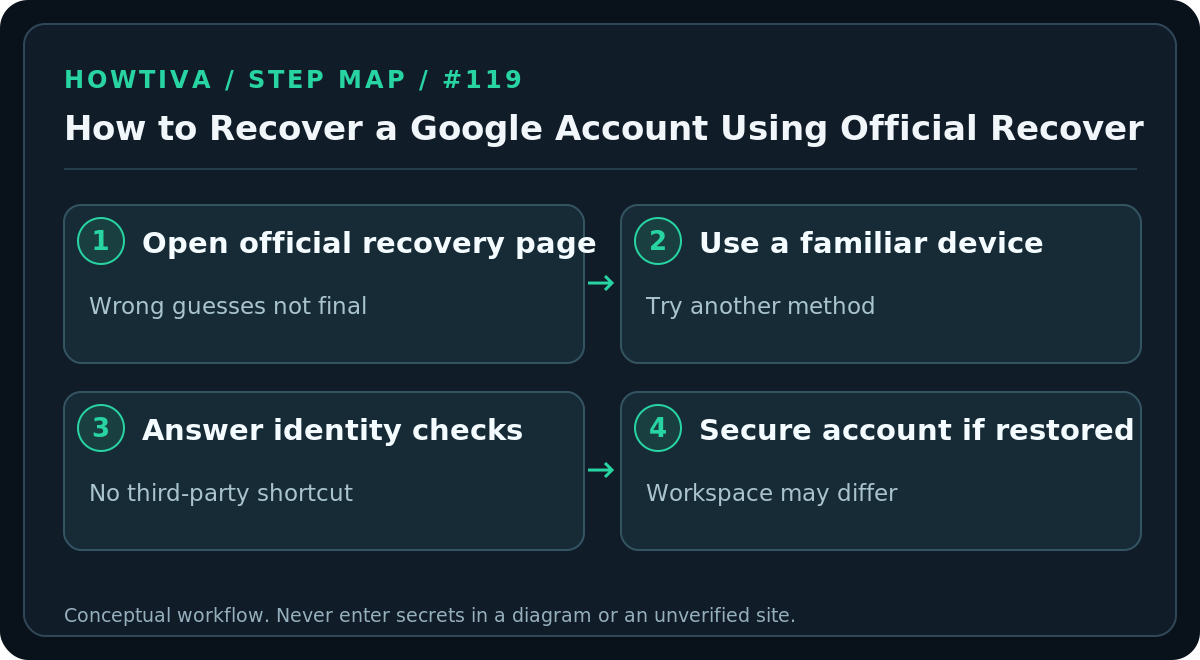
Google says wrong guesses do not automatically end the recovery process and that you can try again. An account managed through work or school may have different recovery rules—contact the organization that administers it. Keep the recovery process on Google’s domain; only enter a password or verification code where Google’s legitimate sign-in flow requests it.
Recover when you no longer have your old phone
Try an existing recovery email, another trusted device or another authentication option offered through Try another way. If you have saved Google backup codes and the sign-in screen offers that method, use an unused code only on Google’s genuine site. Avoid changing all of your trusted sign-in factors at once while still signed in on another device.
If you recently changed account recovery information, Google warns that updates can take up to seven days to take effect. This does not guarantee a recovery on a particular date; it simply explains why a newly changed phone number or email may not immediately work in a recovery attempt.
If Google says it could not verify ownership
Try again on the familiar device and browser, avoid unnecessary VPN or network changes, and think carefully about any previous password you genuinely recall. Google’s help recommends answering as many questions as possible rather than skipping them. If a recovery email is requested, choose an address you can access. Check your inbox and spam folder for expected messages, then verify any instructions through the official recovery page.
Do not ask a friend or a forum participant to “receive the code for you,” and do not give a caller remote access to your device. Google says it does not work with third-party account- or password-recovery services and that you cannot call Google to have an agent sign you into a personal account.
If someone else may have taken over the account
Recover through the same legitimate recovery route, but treat subsequent security cleanup as essential. After regaining access, change the password, check recovery phone numbers and emails, inspect signed-in devices, review any connected third-party apps, and restore MFA or passkeys. If Gmail access was affected, inspect forwarding, filters and delegated access. Separate the evidence of an actual takeover from a mere sign-in failure caused by a device update or forgotten password.
If the account contains sensitive work data, follow organizational incident procedures. For a child account, Google documents separate parent/guardian reset options in eligible cases.
Troubleshooting and alternatives
- You forgot the email address: Use Google’s username-finding flow with the recovery contact and name linked to the account. Don’t try to access accounts that aren’t yours.
- You cannot receive the offered verification message: Check that you control the destination; choose another available method from the official flow, or retry later from a familiar device.
- A previous password doesn’t work as the new password: Google may ask for an old password as ownership evidence; entering an old password does not make it valid for ordinary login.
- You keep seeing the same question: Use the available answers or alternative methods; repeated random attempts from different locations may be unhelpful.
- No recovery method succeeds: Google’s documentation does not promise successful recovery for every account. Consider creating a new account and updating other services that depend on the inaccessible address.
After recovery: reduce the risk of another lockout
Add a current recovery email and phone number where appropriate, review security alerts and keep alternative sign-in methods under your control. If you use a password manager, ensure you can unlock it independently. Store any authorized backup codes securely and avoid clicking recovery links delivered by strangers. Keep a copy of important data via supported export or backup features when possible.
FAQ
Can Google Support tell me the password? No. Account recovery is a verification process, not retrieval of your existing password.
Will trying again automatically lock me out forever? Google says wrong guesses do not terminate the account-recovery process, although different security checks may appear.
Can this recover a Google Workspace work account? Your administrator may control recovery. Contact the official workplace or school helpdesk.
Sources & Further Reading
- Google recover account or Gmail — recovery flow, username recovery, repeated attempts, managed accounts and no paid service.
- Google tips for account recovery — familiar device/browser/location, previous passwords and safe email prompts.
- Google devices and sessions — post-recovery session review.
Use the checklists as you go, and confirm the result before moving on to a more involved repair.