How to Recover an Apple Account Using Official Recovery Options
Reset from a trusted Apple device first; otherwise use iforgot.apple.com or the Apple Support app, then follow recovery wait rules.
Quick answer: If you forgot your Apple Account password, first try resetting it on an already trusted iPhone, iPad or Mac. On iPhone or iPad, go to Settings → [your name] → Sign-In & Security → Change Password, then follow the device-passcode prompts. If no trusted device is available, use iforgot.apple.com or the Apple Support app on a borrowed Apple device. Apple’s account recovery may require a waiting period that support cannot shorten.
Apple ID is now called Apple Account. The same account email address or phone number remains relevant. “Reset your password” is different from the more restrictive account recovery process used when you cannot satisfy normal reset checks. Choose the easiest legitimate path that you are eligible to complete.
Reset the password from a trusted Apple device
- Choose an iPhone or iPad already signed in to your Apple Account and unlocked with a device passcode.
- Open Settings, tap your name, select Sign-In & Security, then Change Password.
- Enter the device passcode when asked. Follow Apple’s prompts to set a new password. Apple may perform additional verification depending on the account.
- On a trusted Mac, open System Settings → [your name] → Sign-In & Security → Change Password and follow the prompts using the Mac’s required authentication.
- After a successful reset, review your trusted phone numbers and devices and confirm the new password works on your own devices. Avoid removing the last trusted method until another one is ready.
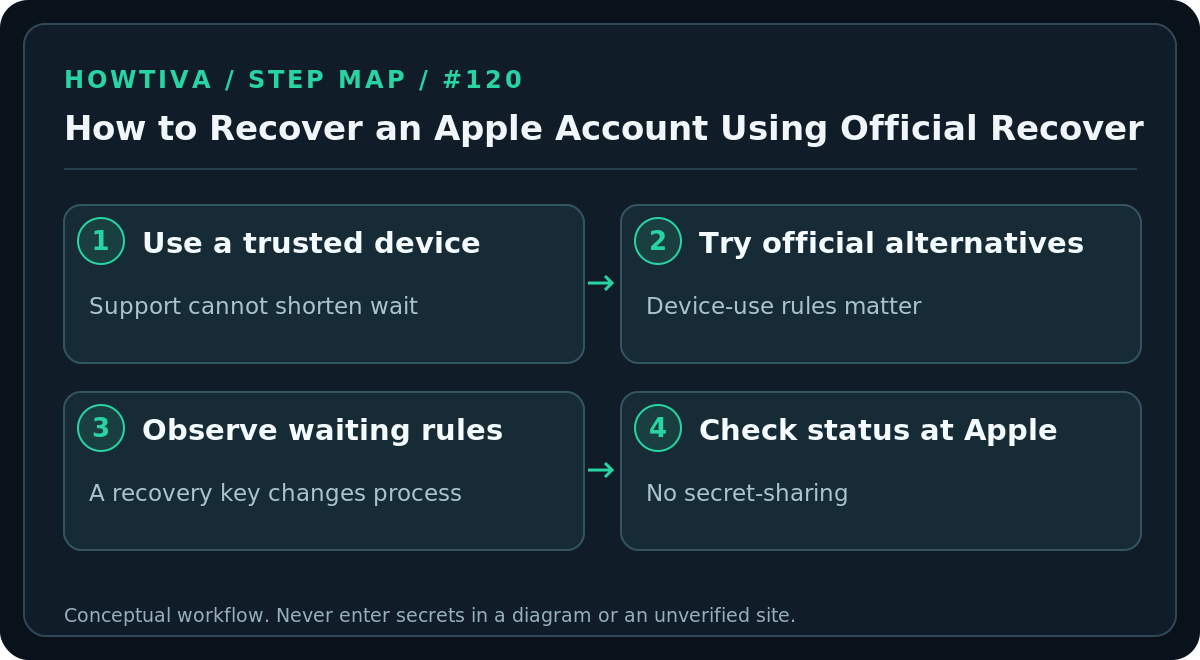
A trusted Apple device is a previously signed-in device that Apple recognizes through two-factor authentication. Someone else’s phone—even a family member’s—is not automatically your trusted device. Use Apple’s special Support app flow when you need help from a borrowed device.
No trusted device? Use the official alternatives
Open https://iforgot.apple.com/ manually and follow the instructions for your account. Apple may direct you to a trusted device, send verification to a trusted phone number or offer account recovery. On a borrowed Apple device, open the official Apple Support app, find Support Tools → Reset Password → Help Someone Else, and follow the prompts. Apple says information entered through this special borrowed-device process is not stored on that device.
If you expect to regain access to a trusted device or trusted phone number soon, Apple recommends considering that option first; it can be faster than account recovery. Do not hand your password, passcode or verification codes to the owner of a borrowed device.
When account recovery is required
Account recovery is for situations where you cannot reset with available trusted factors. Apple may send a confirmation email (or an iMessage for accounts that use only a phone number) within 72 hours, giving an expected time for access or further information. A waiting period of several days or longer may follow. Apple Support cannot reduce the waiting period and submitting duplicate requests does not speed things up.
Apple’s October 2026 help instructions distinguish the device and software used to start recovery. When started on a compatible device with iOS 17, iPadOS 17 or macOS 27 or later, Apple says you can continue using the device that started the process. When started on the web, Apple instructs you to turn off all Apple devices during the wait. Using another device still signed into the account can cancel the request. Because requirements vary with the starting path and software, follow Apple’s current instructions exactly rather than generic advice to keep signing in repeatedly.
Check progress and finish when Apple contacts you
Go directly to iforgot.apple.com to check an active recovery request using the same account and phone information used to start it. Apple may also send an email, text or automated call when access is ready; if no text or call arrives after the indicated time, Apple lists apple.com/recover as a route to continue. Enter any requested information only on Apple’s authentic pages.
If you find a trusted device that can change your password normally during the waiting period, that successful reset can cancel the recovery request. Do not repeatedly experiment with signed-in devices while waiting unless you are intentionally using a supported password-reset path. If you receive a recovery confirmation you did not request, treat that as a security warning and follow Apple’s official cancellation and account-security instructions.
What if you enabled an Apple recovery key?
Apple’s optional 28-character recovery key changes the available recovery architecture. Apple says enabling it disables the standard account recovery process. If you cannot provide the key when required and you lack the necessary other factors, you may permanently lose account access. Follow Apple’s specific recovery-key instructions, rather than relying on the ordinary waiting-period guide. Do not confuse an Apple recovery key with Google’s printed backup codes or a temporary text-message verification code.
Troubleshooting and special cases
- You forgot which email is your Apple Account: Try addresses or phone numbers you may have associated with the account, using only Apple’s official sign-in or support pages.
- The old trusted phone number is unavailable: Choose another offered trusted-device or verification option if available. If none works, Apple’s account recovery process may be necessary.
- No confirmation email after recovery request: Apple recommends waiting the documented 72 hours, checking junk folders and checking status on iforgot.apple.com.
- Account recovery suddenly stopped: Device activity or a successful sign-in can cancel the request; check status rather than automatically restarting.
- Your account says locked or not active: Apple documents separate access-request and troubleshooting paths for locked or disabled accounts. Do not assume a password reset is sufficient.
- Your account belongs to an organization: Managed Apple Accounts can have administrator controls; seek help from the organization’s established IT desk.
FAQ
Can Apple Support waive the recovery wait? No. Apple’s published guidance says support cannot shorten it.
Does resetting the Apple Account password erase my iPhone? Password resetting is not an instruction to erase the device. Device passcodes, Activation Lock and local data access are separate concepts.
Is a recovery contact the same as my trusted phone number? No. An enrolled recovery contact is an optional person who can provide a recovery code through Apple’s authorized process; they cannot read your account.
Sources & Further Reading
- Apple reset forgotten password — trusted iPhone and Mac reset UI.
- Apple if forgotten and unable to sign in — trusted factors and Support app borrowed device path.
- Apple account recovery waiting period — 72-hour notice, device use conditions, status, waits and cancellation.
- Apple recovery key — recovery key replaces standard recovery path.
- Apple recovery contact — recovery contact nature.
Use the checklists as you go, and confirm the result before moving on to a more involved repair.