How to Set Up Bank Account Alerts
Set bank balance, debit-transaction and security alerts safely without inventing bank app screens, with calculations for useful thresholds.
Quick answer: Sign in through your bank’s verified official app or website, find its notifications or alerts settings, activate low-balance and transaction alerts that the bank actually offers, and confirm the delivery channel. Add security alerts for new devices, changes to contact information and suspicious activity if available. Test the notification path with the bank’s built-in test feature or by observing a genuine normal transaction; do not send money to a stranger merely to test an alert.
Your result: A written alert plan with sensible thresholds, a known delivery route, a reminder to review statements and a way to respond safely to warnings. Banking menus, push permissions, minimum thresholds, charges, transaction-trigger policies and delivery delays vary by institution, device and location; this article does not invent exact menu names or claim hands-on testing.
Why alerts help—and where they can fail
Low-balance warnings can reduce the chance that upcoming bills hit an underfunded account. Purchase or withdrawal notifications can reveal activity you do not recognise. Login or security-change alerts may signal unauthorised access. The CFPB recommends low-balance and transaction alerts as aids to better account management. But an alert is a convenience tool, not a guarantee that every transaction is visible instantly or that fraud will be prevented. A push notification can fail if the phone is off, disconnected, has notifications disabled, or is on a battery restriction. An email can land in spam; texts can be spoofed. Continue checking the actual account and statements.
Prepare before enabling anything
Have your bank’s correct app or website, a device you control, up-to-date contact details, access to the bank’s authentication process and a list of upcoming bills. Check whether your institution offers push, email or SMS notifications, which ones are compulsory, and any provider or carrier messaging charges. Use app-store links or official domains, not links in unexpected texts. If you share a phone, consider lock-screen privacy: an SMS or push preview may reveal balances or merchant names to other people.
Define what the alert means: a posted debit, a pending authorisation, available balance below a threshold, an overdraft, a monthly statement ready to view, or a rejected payment are different events. Ask the bank which balances and transaction types are supported. Keep a verified fraud-report number in contacts, but never accept the callback number supplied by an unsolicited message without independent verification.
Step-by-step setup
1. Open the authentic banking channel
Use your bookmarked official website or installed bank app and authenticate using the bank’s normal method. Search its help or account settings for ‘alerts’, ‘notifications’, ‘account activity’ or related wording. These are possible labels, not a universal click path. If you cannot locate alerts, check the institution’s official support article or ask the bank where the feature is enabled. Some providers control card, deposit-account and account-security alerts in different areas; review each relevant section.
2. Enable security alerts first
Where available, choose notifications for new-device logins, password changes, contact-detail changes, new payees, unusual payments, card-not-present purchases and card locks. These do not replace multifactor authentication and a strong, unique password. If you receive a suspicious message, sign in independently to review activity and contact the bank via a known channel. Avoid replying with passwords, one-time codes or banking credentials.
3. Calculate a realistic low-balance threshold
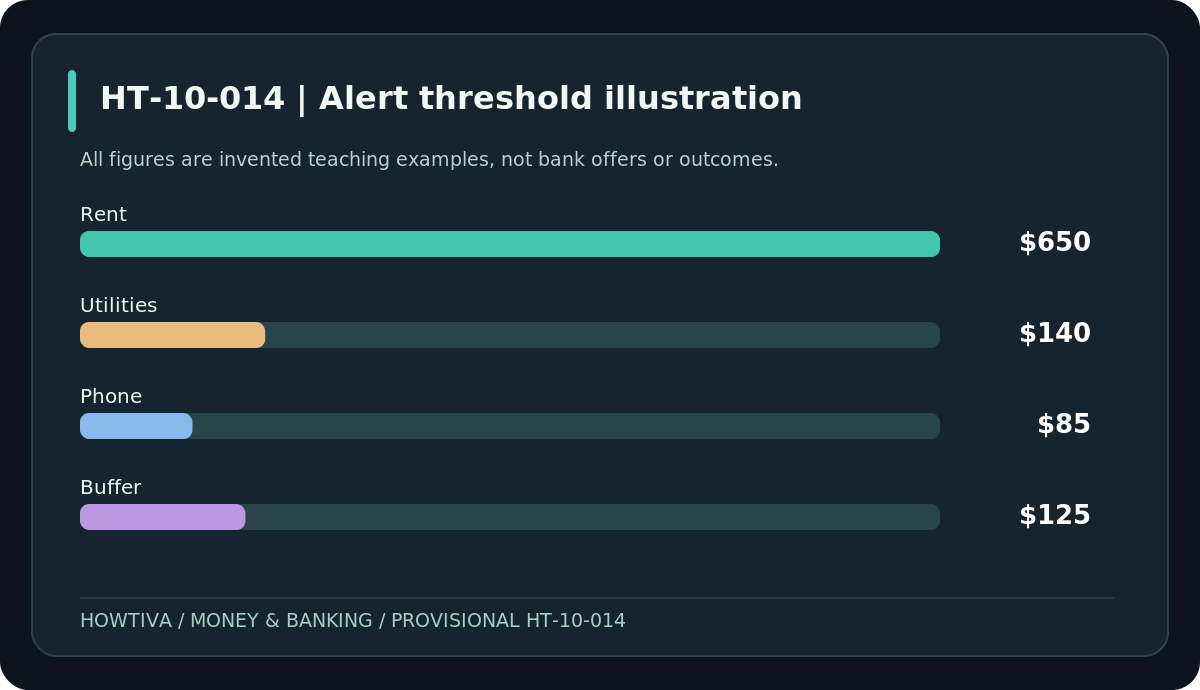
An alert threshold should reflect upcoming charges, not an arbitrary universal number. Consider a fictional account with an upcoming $650 rent, $140 utility bill, $85 phone payment and a personally chosen $125 buffer. Total scheduled needs are $650 + $140 + $85 + $125 = $1,000. In this example, a $1,000 low-balance warning may prompt review early enough to avoid a shortage. It does not mean the bank reserves those funds. If some bills fall after the next secure income date, adjust the alert timing and threshold to your real cash flow. Consider a second, urgent lower threshold if supported.
4. Set transaction alerts by meaningful triggers
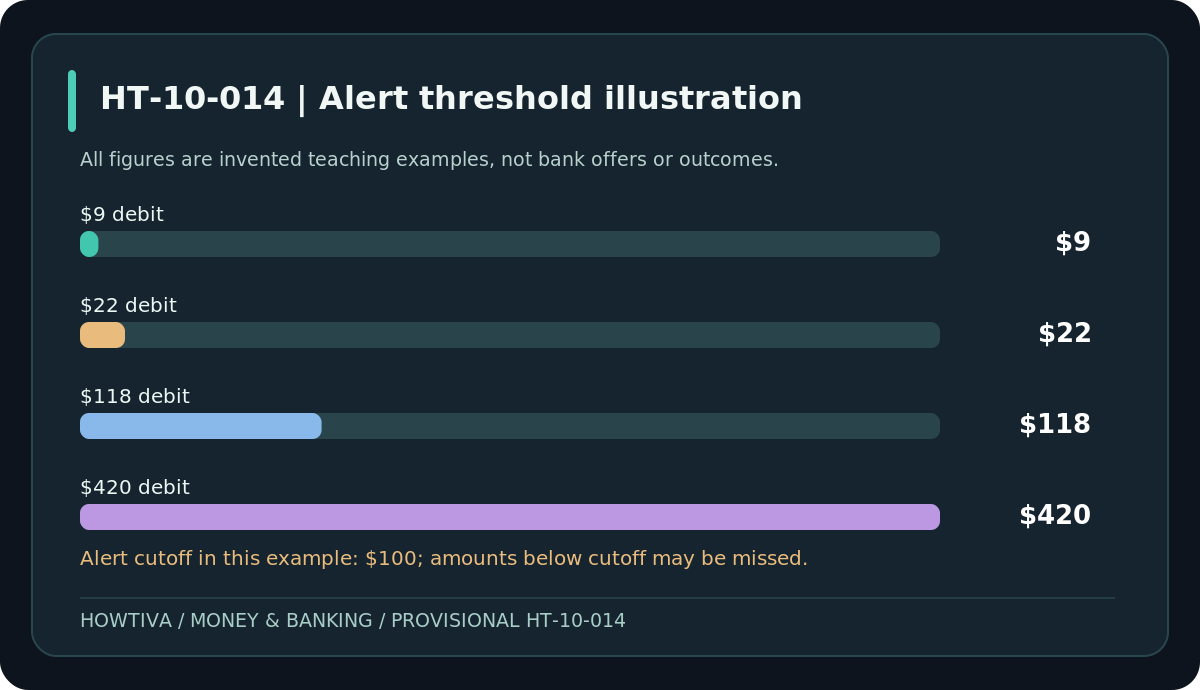
Where supported, enable notifications for every withdrawal or debit, or for amounts above a lower bound you are willing to monitor. A threshold-only alert misses transactions below the cutoff. For example, an imaginary $100 transaction threshold would flag fictional debits of $118 and $420, but may not flag $9 and $22 charges—even if those small charges are unauthorised. That is why statement review remains essential. Check whether card transactions and direct debits have different notification settings, and whether incoming direct deposits merit alerts so you can time planned transfers appropriately.
5. Select channels, permissions and privacy carefully
For a primary security event, a bank may support a push alert, SMS, email or multiple channels. Prefer a channel you reliably receive and can keep private. Check the phone’s notification permissions for the banking app and any bank-side notification controls; each operating system uses different labels. Keep recovery phone and email details current, and confirm that you can access banking if the phone is lost. Avoid showing full financial details on a shared lock screen. Some alert types may carry charges; verify current bank terms and mobile data/SMS charges rather than assuming every service is free.
6. Confirm delivery without risking money
If a safe test notification exists in your bank’s settings, use it. Otherwise, wait for a genuine ordinary account event that should qualify and check whether you received a corresponding alert. Record the date and event type, not sensitive account numbers. If no alert arrives, inspect bank-side registration, phone permissions, email filters, text short-code blocks and whether the event was eligible. Do not create artificial overdrafts or send a payment to an unknown payee as a test. One successful alert does not prove that every future event will be delivered.
7. Define what you will do when an alert arrives
For an ordinary low balance: verify the available funds, review pending bills and adjust the budget or transfer from your own savings only if appropriate. For an unfamiliar debit or login: do not click the alert’s link; open your official bank app independently, review the full transaction and contact the bank’s fraud team if needed. Note date and reported facts. Alert delays do not suspend jurisdictional card-dispute notification deadlines; a statement review provides an independent check.
8. Review alerts and statement checks every month
At least monthly, reconcile statements, inspect transaction history and verify that your phone/email details are current. If the alert threshold causes constant noise, tune it without disabling security alerts. Update the plan after changes in rent, bill timing, pay schedule, bank account or device. When closing an account, confirm any lingering alerts and linked app connections are removed safely.
Common troubleshooting
Push notifications arrive late: update the app through the official store, review network connectivity and battery/background notification restrictions, and contact bank support for delivery rules. Texts arrive but I never opted in: treat messages as untrusted until verified via the bank; an attacker can spoof sender names. Low-balance alert came after a fee: posting delays, holds or threshold logic may mean the warning is not predictive. I get alerts for every subscription: group categories or use a sensible high-value threshold if available, but keep full statement checks. Different card and bank alerts show different amounts: pending card authorisations may differ from final settlement and bank balances. The bank app has no notifications menu: do not guess; inspect official support or telephone banking, or rely on secure statement review and external bill reminders.
Alternative methods and exceptions
You can maintain a bill calendar and a manual balance register if electronic alerts aren’t available or are inaccessible. Some banks provide printed statements, automated phone balance lines or only email, while others provide real-time mobile push. A non-bank third-party budgeting app may offer its own notifications, but requires evaluating data-sharing permissions and whether access credentials are being requested; do not hand passwords to an untrusted service. Business, joint and student accounts may offer different alert authority and privacy. In joint accounts, clarify which account holders receive sensitive activity notifications.
Country-specific considerations — checked 27 October 2026
United States: CFPB advises balance and transaction alerts as useful tools for avoiding unexpected fees, but exact configuration and message costs are provider-specific. United Kingdom: bank-app push and scam warnings vary across providers; do not assume a warning guarantees a transfer is safe or protected. Canada: FCAC includes withdrawal email alerts as a feature to compare across chequing products and advises online-banking security precautions. Australia: Moneysmart encourages prompt checks of unfamiliar transactions and use of banking security controls; third-party apps and providers differ. In all countries, privacy and phishing precautions apply.
Frequently asked questions
Will an alert stop a payment? Usually no. Warnings are notifications; card freezes, payment controls and dispute reports are separate actions.
What is the best low-balance number? One based on the bills due before reliable income plus an affordable buffer; there is no universal threshold.
Should I set alerts for every transaction? That can reveal small unfamiliar charges, but consider notification fatigue and privacy. Statement reviews remain important regardless.
Can I trust a message that displays my bank name? Not solely on that basis. Sender IDs, links and caller IDs can be spoofed. Authenticate independently.
Do alerts cost money? Some are free, but banks or mobile carriers may charge. Check the official current terms.
Final checklist
- I entered alerts through the authentic bank app or website.
- I enabled relevant security changes and purchase/debit notifications where offered.
- I calculated a threshold from actual bills and a realistic buffer.
- I checked device permissions, delivery channels, privacy and possible charges.
- I know how to verify a suspicious alert without clicking its link.
- I scheduled statement review even if alerts appear reliable.
Sources & Further Reading
- CFPB — Managing a new checking account.
- CFPB — Know your overdraft options.
- CFPB — Suspicious bank texts and emails.
- CFPB — Prepaid-card text alert services.
- FCAC — Chequing accounts.
- FCAC — Online banking rights and responsibilities.
- ASIC Moneysmart — Bank transaction problems.
Last researched: 27 October 2026. Illustrative balances and events only; no particular app screens or notification behaviour were hands-on tested.
Use the checklists as you go, and confirm the result before moving on to a more involved repair.